How to measure monitor size
How Do You Measure a Monitor Size?
Monitor size is measured diagonally from one corner of the visible screen to the opposite corner. Only the display area is measured — not the bezel or frame.
For example, if the diagonal measurement is around 23.8 inches, the monitor is marketed as a 24-inch display.
Step-by-Step Guide
Step 1: Get a Measuring Tape
Use a measuring tape or ruler. Make sure the monitor is turned off for easier measurement.
Step 2: Measure Diagonally
Place the tape at the bottom-left corner of the visible screen and extend it to the top-right corner.
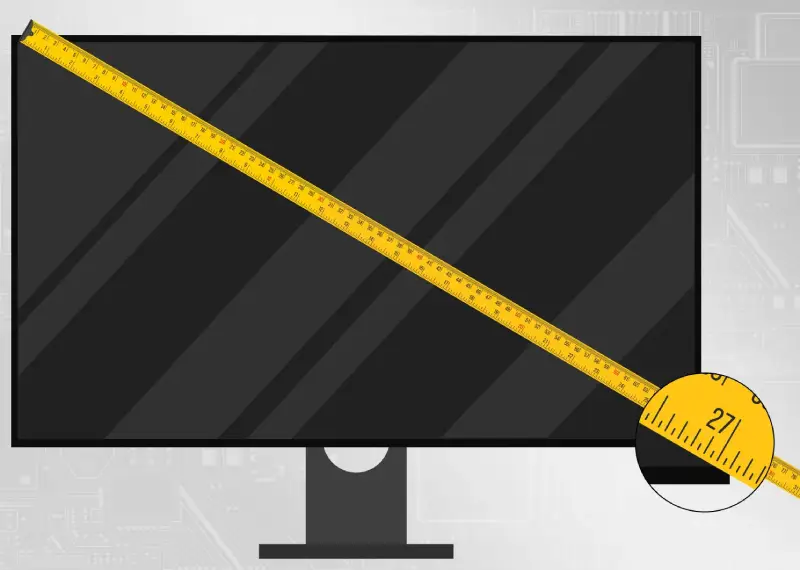
Do not include the surrounding plastic frame (bezel).
Common Monitor Sizes
- 21–24 inches → Office & home use
- 27 inches → Gaming & design
- 32 inches → 4K productivity
- 34 inches → Ultrawide monitors
- 40+ inches → Professional creative work
Screen Size vs Screen Resolution
Screen size refers to physical measurement in inches. Resolution refers to pixel count (for example, 1920 × 1080).
| Screen Size | Resolution |
|---|---|
| 24 inches | 1920 × 1080 |
| 27 inches | 2560 × 1440 |
| 32 inches | 3840 × 2160 (4K) |
How to Calculate Monitor Size Using Width & Height
If you know the width and height in inches, use this formula:
Diagonal = √(width² + height²)
Example:
Width = 20.9 inches
Height = 11.8 inches
Diagonal ≈ 24 inches
Frequently Asked Questions
Does monitor size include the bezel?
No. Only the visible display area is measured.
Can two monitors have the same resolution but different sizes?
Yes. Resolution does not determine physical screen size.
Can websites detect my monitor size automatically?
No. Browsers restrict access to physical measurements for privacy reasons.