What Is Screen Resolution?
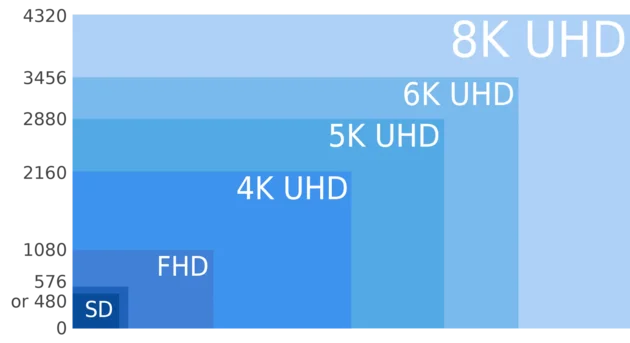
Screen resolution refers to the total number of pixels displayed on your screen, expressed as width × height. For example, a resolution of 1920 × 1080 means your display shows 1,920 pixels horizontally and 1,080 pixels vertically.
The higher the resolution, the more pixels are displayed, resulting in sharper text, clearer images, and more detailed visuals.
How Screen Resolution Works
Every digital display resolution is made up of tiny dots called pixels. Each pixel can display a different color. When combined together, these pixels form the images and text you see on your screen.
Resolution simply tells you how many pixels fit on your display. More pixels = more detail.
Common Screen Resolutions
- 1366 × 768 — HD (common on older laptops)
- 1920 × 1080 — Full HD (very common standard)
- 2560 × 1440 — QHD
- 3840 × 2160 — 4K UHD
- 7680 × 4320 — 8K
Screen Resolution vs Display Size
Resolution is not the same as screen size. A 15-inch laptop and a 27-inch monitor can both have 1920 × 1080 resolution.
Screen size refers to the physical measurement (in inches), while resolution refers to pixel dimensions.
How to Check Your Screen Resolution
You can check your screen resolution instantly using our free tool:
👉 Check Your Screen Resolution Now
The tool detects your CSS screen size, viewport size, device pixel ratio, and estimated physical resolution in real time.
Why Resolution May Look Different
Modern operating systems use display scaling. This means your browser may report a different resolution than your monitor’s physical hardware resolution.
For example, if your monitor is 1920 × 1080 but scaling is set to 125%, your browser may report 1536 × 864.
To understand this better, read: What Is Device Pixel Ratio?
Does Higher Resolution Always Mean Better?
Not necessarily. Higher resolution improves clarity, but it also:
- Uses more GPU power
- May reduce gaming performance
- Consumes more battery on laptops
The best resolution is usually the “recommended” resolution in your operating system settings.
Conclusion
Screen resolution determines how detailed your display appears. Understanding it helps with gaming, design, development, and troubleshooting.
Want to see your current resolution instantly? Use our free resolution checker tool.